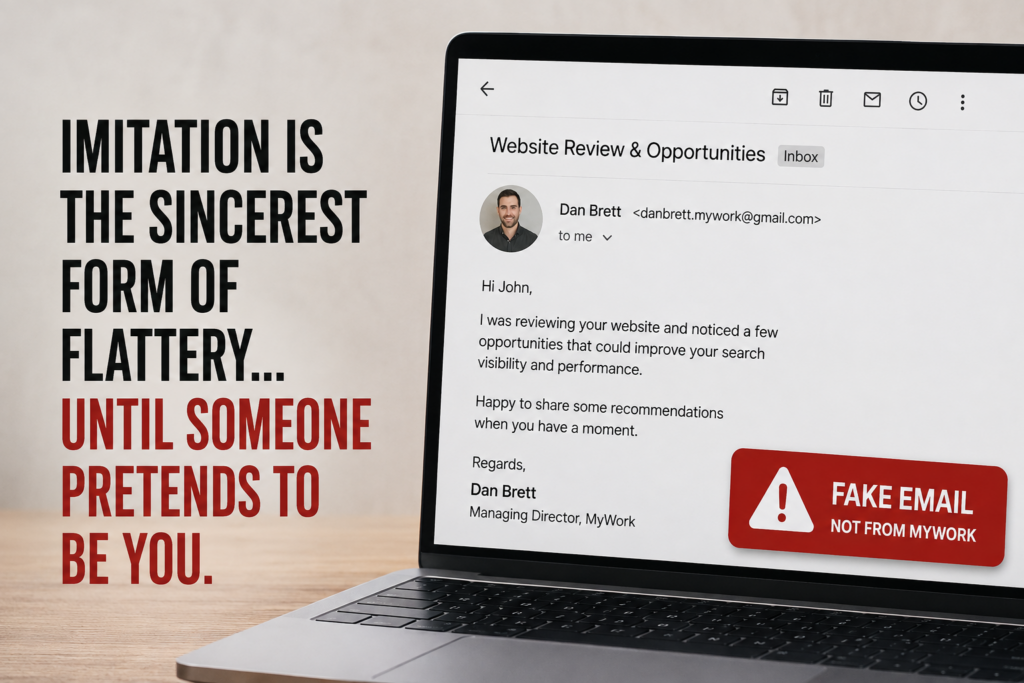

A few years ago, scam emails were relatively easy to spot.
They were full of spelling mistakes, awkward grammar and strange requests that immediately raised red flags.
Today, that’s changed.
Recently, someone impersonated me and sent highly convincing emails to a number of MyWork clients.
While the impersonation itself was not particularly surprising, what happened next was.
Several clients contacted us because something did not quite feel right. The emails looked professional, referenced genuine website issues and contained recommendations that, in some cases, were technically correct.
That is exactly what makes this new generation of AI-assisted scams so convincing.
The scammer did not need insider knowledge. They simply used publicly available information, analysed the client’s website and combined it with AI to produce an email that looked like it had been written by someone who genuinely understood their business.
If I am honest, parts of the email were better written than some legitimate sales emails I have seen over the years.
That is the world we are now operating in.
AI is not just changing how businesses market themselves or build websites. It is also changing how scammers earn your trust.
The good news is that once you know what to check, these emails are still relatively easy to identify.
What Happened?
Over the past week, several MyWork clients forwarded us emails that appeared to come directly from me.
At first glance, they looked genuine:
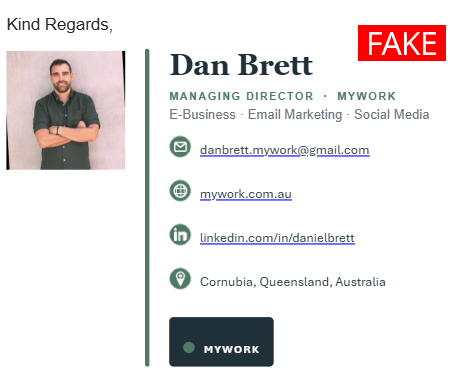
The sender introduced themselves as Dan from MyWork, referenced the recipient’s business by name and provided what appeared to be a personalised review of their website.
The email pointed out opportunities for improvement, discussed search visibility and suggested technical changes that would supposedly improve the website’s performance. All based on publicly available data.
For a business owner receiving an unsolicited email like this, it would have been easy to assume it was someone from our team reaching out.
The problem was, we never sent it.
Although the sender was pretending to represent MyWork, the email had come from an unrelated Gmail account.

Fortunately, our clients recognised that something was not quite right and contacted us before responding.
Why These Emails Feel So Convincing
Traditional phishing scams relied on volume.
Send enough terrible emails and eventually someone clicks.
AI has changed that approach.
Instead of sending the same generic message to thousands of people, scammers can create emails that appear to have been written specifically for your business.
They can analyse publicly available information including:
- Your website
- Your Google Business Profile
- Public information about your business
- Your social media pages
- Search engine results
- AI search results
- Public company and staff information
From that information alone, AI can produce an email that feels surprisingly personal.
It can identify genuine weaknesses. It can explain them clearly. It can even recommend sensible improvements.
That does not make the sender legitimate.
It simply makes the scam more believable.
The Biggest Change Business Owners Need to Understand
For years, we told people to look for poor spelling and broken English.
Unfortunately, that is no longer reliable advice.
Modern AI writes remarkably well. In some cases, scam emails are now grammatically better than genuine emails.
Instead, you need to change the question you are asking.
Do not ask:
“Does this email sound professional?”
Ask:
“Do I know with certainty who actually sent it?”
That is a very different test.
Five Ways to Spot an AI Scam Email
1. Check the actual email address
Do not rely on the display name.
Anyone can call themselves “Dan Brett” or “MyWork”. Always open the sender details and inspect the complete email address.
In this case, the emails came from a Gmail account, not a MyWork email address.
2. Be cautious of unexpected website reviews
Receiving an email highlighting genuine issues with your website does not automatically make it legitimate.
Public website information can be analysed quickly, and AI can turn that analysis into a convincing report or sales message.
3. Verify the sender before replying
If someone claims to represent a business you already work with, contact that business through a phone number or email address you already know.
Do not rely on the contact details, links or phone numbers contained in the suspicious message.
This is also the advice provided by the Australian Government’s Cyber.gov.au scam guidance, which recommends going directly to a trusted source rather than using links or contact details supplied in the message.
4. Do not confuse good advice with good intentions
This is probably the most important lesson from what happened.
Some of the recommendations in these scam emails were perfectly reasonable.
That did not make the sender trustworthy.
A person can provide technically accurate information while still lying about who they are and why they are contacting you.
5. Trust your instincts
Every client who contacted us said roughly the same thing.
The email looked believable, but something felt slightly off.
That instinct is useful. If something does not seem right, stop and verify it before replying, opening an attachment, following a link or sharing information.
What This Means for Businesses
I do not think this is something businesses should panic about.
But I do think it is something every business owner and staff member needs to understand.
AI is making genuine businesses more efficient. It is also making scammers more sophisticated.
The days when a phishing email could always be identified by terrible spelling are disappearing.
We are going to see more personalised, better researched and more convincing messages that blur the line between legitimate advice and malicious intent.
Businesses need to adjust the way they verify communication.
A professional tone is no longer proof. Correct technical information is no longer proof. A familiar name or company logo is no longer proof.
The sender still needs to be verified.
Our Advice to MyWork Clients
If you ever receive an email claiming to be from MyWork and something does not feel right, do not guess.
Forward it to us or give us a call using the details already saved in your records or listed on the official MyWork website.
We will happily confirm whether it is genuine.
We would much rather spend two minutes checking an email than see one of our clients become the victim of an increasingly sophisticated scam.
Final Thoughts
There is an old saying that imitation is the sincerest form of flattery.
That may be true.
But when someone starts impersonating you to target your clients, it becomes a reminder that technology can be used for both good and bad.
At MyWork, we will continue embracing AI to build better websites, create better marketing and deliver more value for our clients.
At the same time, we will keep educating our clients about the risks that come with the same technology.
Because the best defence against AI is not avoiding it.
It is understanding how it is being used.
Frequently Asked Questions
How can an AI scam email impersonate a real business such as MyWork?
A scammer can collect information from a business website, staff profiles, social media pages and search results, then use AI to produce a personalised email. They may use a familiar staff name and technically accurate information while sending the message from an unrelated address.
How can I check whether an email claiming to be from MyWork is genuine?
Check the full sender address and compare it with previous MyWork correspondence. When in doubt, contact MyWork using the phone number or email address already in your records rather than replying to the message or using the contact details it provides.
Can an AI scam email contain accurate advice about my website?
Yes. Public websites can be analysed without access to private systems, so a scammer may identify genuine problems and include reasonable recommendations. Accurate advice does not prove that the sender is who they claim to be.
Is poor spelling still a reliable way to identify phishing and AI scam emails?
No. AI tools can produce clear, professional and grammatically correct emails. MyWork recommends checking the sender’s identity, email domain, request and contact method instead of relying on writing quality alone.
What should I do before replying to a suspicious business impersonation email?
Do not reply, click links or open attachments until the sender has been verified. Contact the organisation directly using details from its official website or information you already trust. If the message claims to be from MyWork, forward it to our team for confirmation.
Why are AI-assisted phishing emails becoming harder for business owners to recognise?
AI allows scammers to create messages that reference the recipient’s business, industry, website and genuine technical issues. This removes many of the spelling, grammar and relevance problems that once made scam emails easy to identify.
What information should I avoid sharing in response to an AI scam email?
Do not provide passwords, verification codes, payment details, customer information, account access or confidential business documents. MyWork will not ask clients to disclose passwords or sensitive access information through an unexpected email.
Can MyWork help me check a suspicious email about my website?
Yes. If an email claims to come from MyWork or relates to a website we manage, send it to our team or call us using our official contact details. We can confirm whether it is genuine and advise you on what to do next.